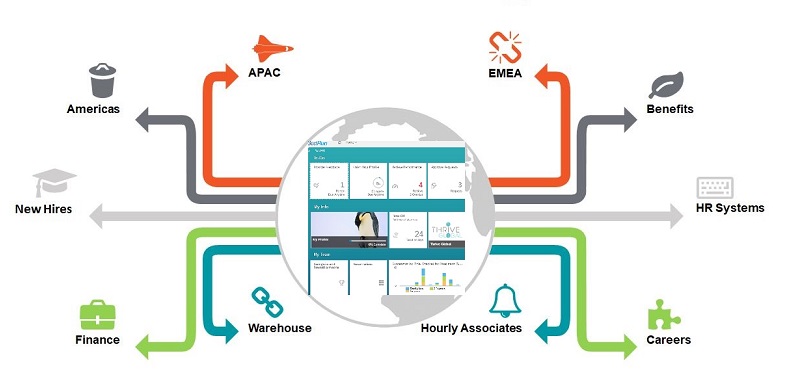
The most viewed page in your SAP SuccessFactors system will be the Home Page. It is also the default landing page and is the first screen your new users will see in the system so having a dynamic and impactful home page should be one of the key actvity in your SAP SuccessFactors implementation project plan.
In this blog I will cover the five admin tool features that you can use to create a home page that can be customized for each employee and still be simple, intuitive and visually appealing. One recommendation is to involve your marketing department to ensure a consistent branding and color scheme and also your IT personnel if you are looking to establish links from your home page to other internal and external systems.
Robotic Process Automation (RPA) is primarily used to automate processes that are repetitive and uniform in nature. They are very effective when the process is stable and minimal logic and decision making are required. But bots are becoming more advanced and with the inclusion of machine learning they will be able to automate more complex processes. The question is whether they are currently capable of automating SaaS system configuration.
Configuration and code generating are certainly more complex than automating a well-defined process. There are more variables and the utilization of complex logic is required. The system architecture and UI used for configuration can have a lot more features available which the bots will need to be trained on how to use. With that being said, I think the future of using RPA for automating SaaS system configuration is actually here.
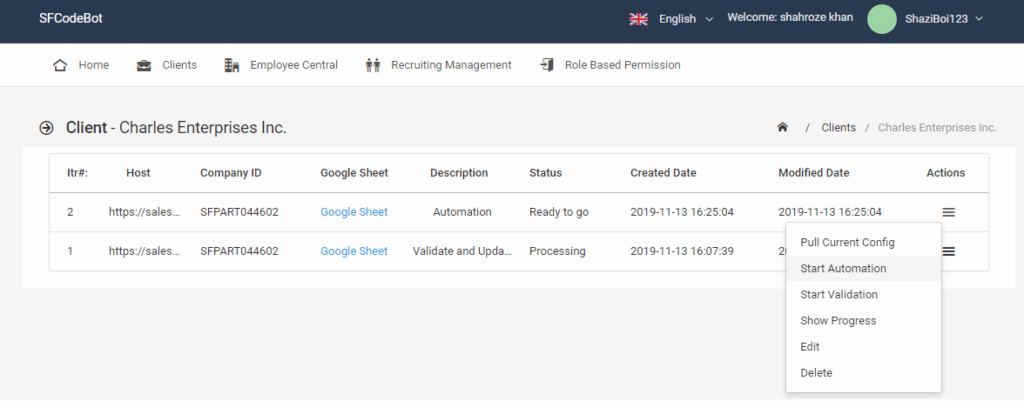
In this blog, I will cover how bots can be used to auto configure SAP SuccessFactors and the benefits that can be derived. This is based on a recently completed POC. Some portions of the process are captured in a video which can be found at the bottom of this blog.
There are multiple use cases where RPA can have an impact on SaaS system implementation and maintenance. Here are some of the more preliminary activities that can be completed by using Bots
1) Reverse engineer configuration workbooks from the actual system configuration
2) Auto configure the system based on the design captured in the workbook
3) Porting configuration to multiple instances/tenants (QA, Parallel, Prod)
4) Use the same configuration workbook to maintain current configuration across multiple environments
5) Validate system configuration
Using RPA for Iteration One
I will run thru the Auto Configuration activity (for Iteration One) in more detail so you can see how bots can be incorporated into the typical SaaS project implementation.
Here are the steps to complete Iteration One when using Bots
1) Client is assigned a pre-built instance/tenant
2) An RPA is triggered that reverse engineer the creation of the config workbook from the actual baseline configuration in the system
3) Consultants work with clients to document all Iteration One changes in the config workbook as they currently do
4) An RPA process is triggered and uses the workbook to complete the Iteration One configuration in the system
5) A second RPA process gets triggered after the config process is complete to compare the config workbook with the actual system configuration and flag any discrepancy
6) The system is returned to the client for Iteration one validation
Benefits
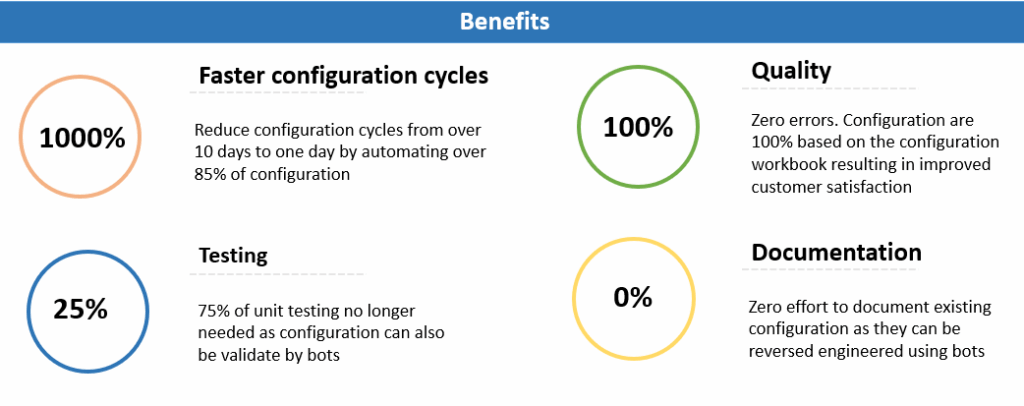
The configuration of a typical Iteration one cycle will take approximately two or more weeks to complete. Using RPA this can be done in a fraction of the time. But that is not the only benefit. Manual configuration is costly, time consuming, error prone and communication between onsite consultants and back off configurators is never perfect. Using RPA to auto configure a SaaS system will eliminate most of these issues. From an implementation perspective, here are the four top areas where RPA can have an impact.
From an overall business perspective there are lot more benefits to be gained. The first SaaS vendor that is able to effectively use RPA to automate configuration will have a huge advantage. Their implementation cost will be less. The implementation timeline will be compressed. As such clients will realize benefits earlier and get a better ROI. Client satisfaction will also increase since they will be dealing with less errors, delays and resource utilization. The end result is a larger market share for this vendor.
Conclusion
I have just touched on a few of the areas where RPA can have an impact on SaaS implementation. There are numerous others such as testing and integration. There is one other area that is currently very relevant to SAP SuccessFactors. That is the migration of clients from Onboarding 1.0 to 2.0. How about using bots to capture the client configuration of Onboarding 1.0 in a workbook and then using bots to build out the same configuration in Onboarding 2.0.
Please click here for a video showing how bots can be used to Reverse Engineering the EC configuration workbook and also how to auto configure changes from the workbook into the SAP SuccessFactors Employee Central module.
For more information about implementing SAP SuccessFactors, you can access my other blog posts.
Data Migration is like integration in many ways. They both move data from one system to another. They are both complicated activities that are totally dependent on the system configuration. Decisions about project scope, budget, timing and resources are often made without fully understanding the impact to data migration and integration. As a result any large, global Employee Central project will likely experience multiple challenges with data migration. Here are some mitigation approaches for the more common data migration challenges.
When implementing the SAP SuccessFactors product suite, there are many different deployment options. Each client and implementation partner can have a preferred approach about which module should be implemented first and the deployment sequence for the remaining modules. There are however, some pros and cons to the sequencing of the modules and other factors that should be considered when defining the implementation order. In this blog, I will look at the guidelines and key factors influencing the module deployment decisions for an SAP SuccessFactors product suite implementation.
A request we often get from clients is whether SAP SuccessFactors can be a hub for employees to access other Human Resources Systems. The good news is that this capability is now supported. For many clients, SAP SuccessFactors will be one of the most widely used application suites, and having the capability to use it as a hub for linking to other applications will improve the adoption and benefits that you can derive from SAP SuccessFactors product suite.
So you’ve selected the SAP SuccessFactors HCM suite as the core HR and/or Talent Management cloud solution for your company, now what? The next step will impact the overall success of your project, and that is the selection of your internal implementation team and an implementation partner. In the SAP SuccessFactors ecosystem, there are many implementation partners to choose from. In this blog post (which is an excerpt from my book, Implementing SAP SuccessFactors – A Client centered approach) I review the key criteria and approach for selecting an implementation partner.
For the past few years, the integration capabilities of SAP SuccessFactors have expanded significantly. With the introduction of Intelligent Services, there is now support for real-time integrations and a platform to improve cross-module integrations and updates.
In my first blog on how to extend SuccessFactors core capabilities by using Boomi, we looked at the automatic creation of Development Goals in the Career and Development Planning (CDP) module. Here, we will look at compensation data.
In SAP SuccessFactors, Single Sign On (SSO) provides a secure and seamless method for a user to access the system without having to enter their credentials. The SSO methods supported by SAP SuccessFactors fall into two main groups. The first is token based SSO and the second is Security Assertion Markup Language (SAML). SAML is based on a pre-defined standard for exchanging authentication information between systems. If your company is already using SAML for SSO with other applications, then that’s what you should use for SAP SuccessFactors as well.