TriMundo LLC
RBP Advisor™ for SAP SuccessFactors

Prove who could see what, and when.

RBP Advisor captures point-in-time snapshots of your role-based permissions, tracks every change between them, and produces append-only compliance evidence your auditor can rely on.

Runs on SAP BTP and opens from a custom navigation entry from SAP SuccessFactors · Single sign-on via SAP Identity Authentication

“Show me your access controls as they stood in March.”

Role-based permissions are where the sensitive decisions live — who sees compensation, who reaches personal data, who can act on another population. A mid-size instance runs to roughly ninety roles, two hundred grant rules, a hundred and ninety groups, and well over a hundred thousand individual permissions.

And it moves. A group is widened during a rollout. A role picks up a permission for a go-live and nobody takes it away. A grant rule is edited to unblock a ticket. Each change is reasonable on its own; together, across a year, they drift.

Then an auditor asks what the permission model looked like at a date in the past, what has changed since, and who approved it. That question has no native answer — which is why it is usually answered with screenshots, spreadsheets and someone's memory.

How It Works

01

Capture

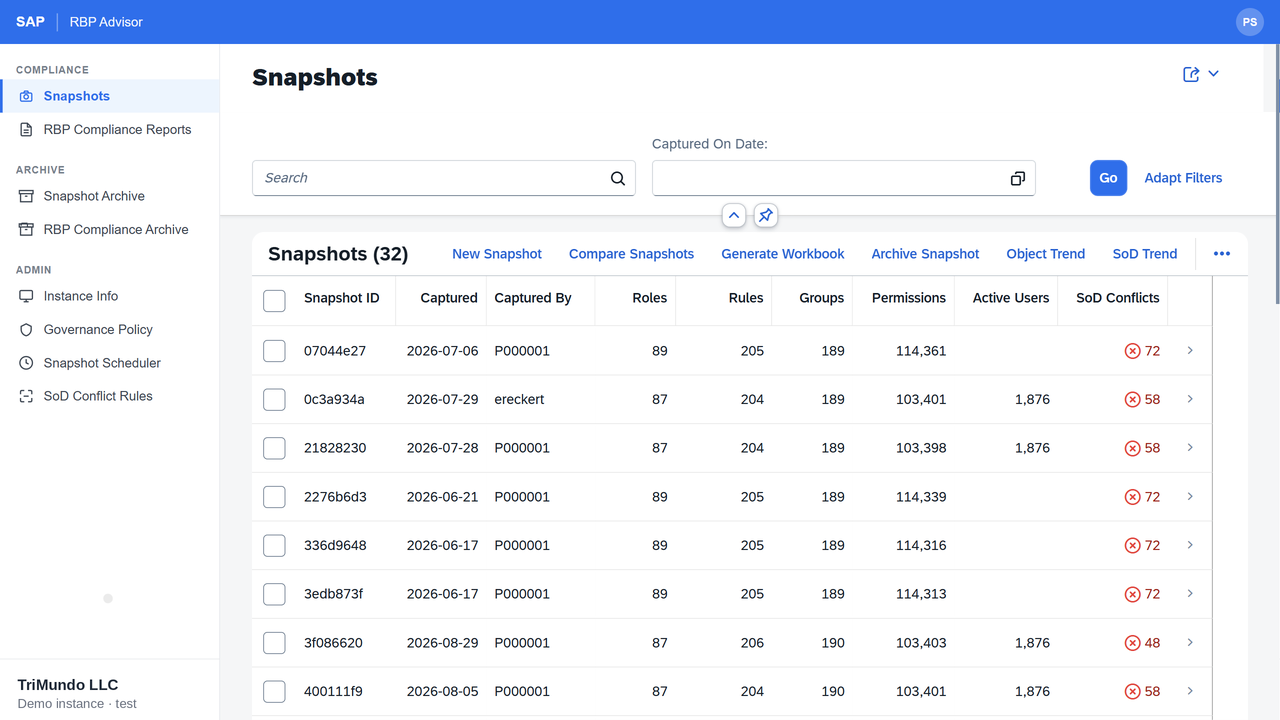
Take a snapshot on demand, or let the scheduler capture automatically. Every capture records who ran it and counts roles, rules, groups, permissions and active users.

02

Compare

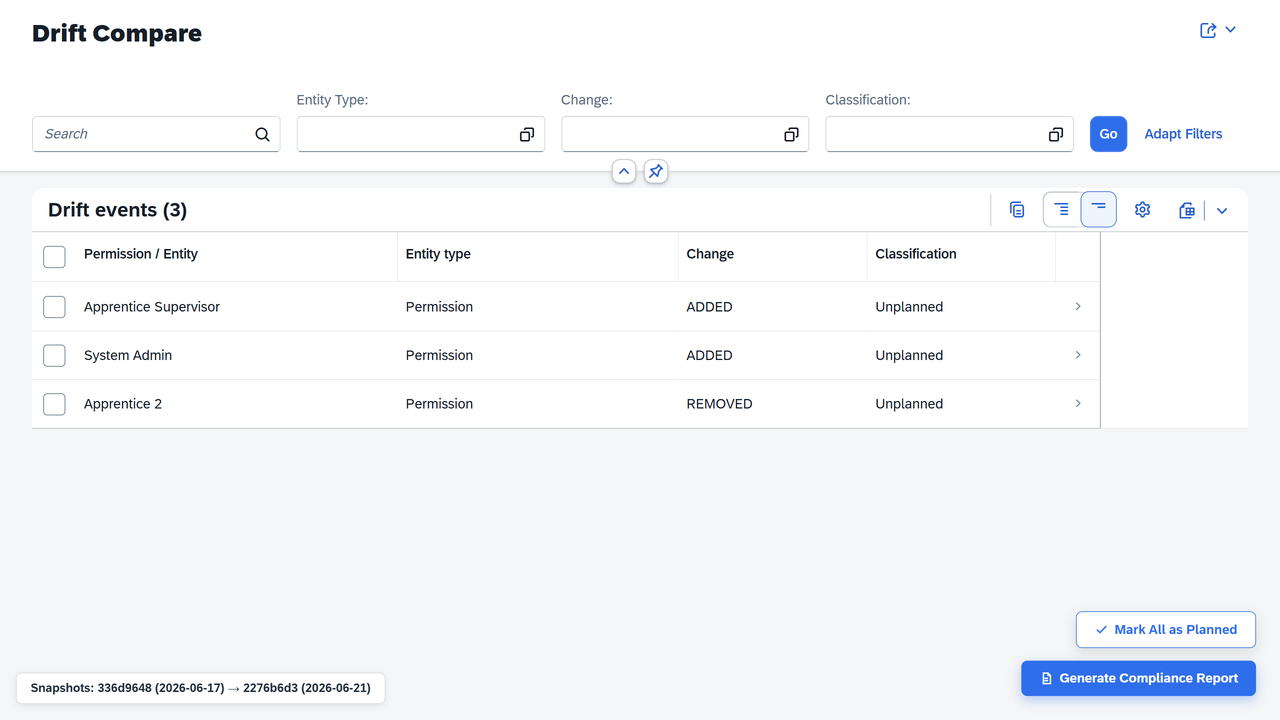
Select any two snapshots. Every difference across roles, grant rules, group membership and permissions becomes a drift event, classified unplanned until someone says otherwise.

03

Acknowledge

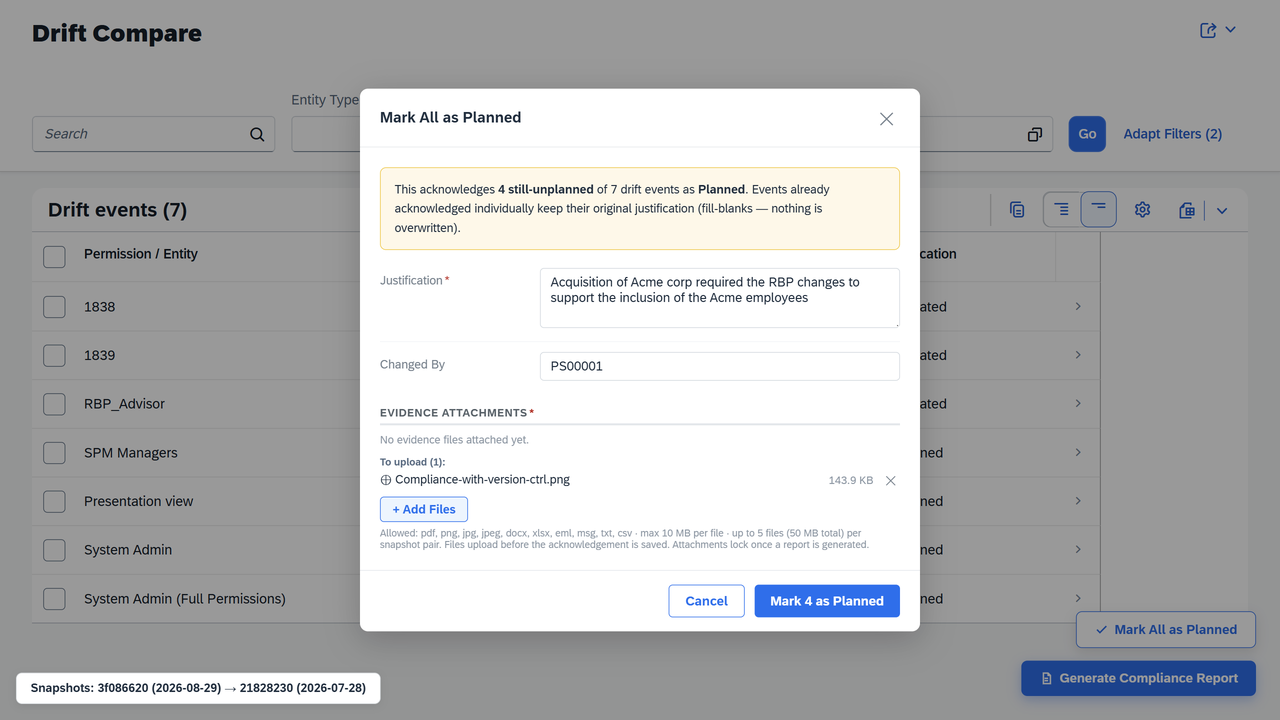
Record a business justification, the approver and an evidence file. Your governance policy decides which of those are mandatory — and the server enforces it.

04

Evidence

Generate a PDF compliance report, versioned and append-only, plus an Excel workbook with the full permission matrix for audit fieldwork.

RBP Advisor snapshot list showing capture history with role, rule, group and permission counts
Snapshot history — every capture with its counts, who captured it, and open segregation of duties conflicts.

Every change, itemised — not summarised

Comparison is field-level. A widened grant rule is not reported as "rule changed"; it is reported as exactly which population it now reaches that it did not before.

Drift comparison listing permission changes between two snapshots, each classified as unplanned
Drift between two snapshots. Everything starts as unplanned — nothing is quietly assumed to be fine.
Disposition dialog recording a business justification, approver and evidence file for detected changes
Acknowledging a change: justification, the SuccessFactors admin who made it, and an attached evidence file.

Evidence you did not have the ability to edit

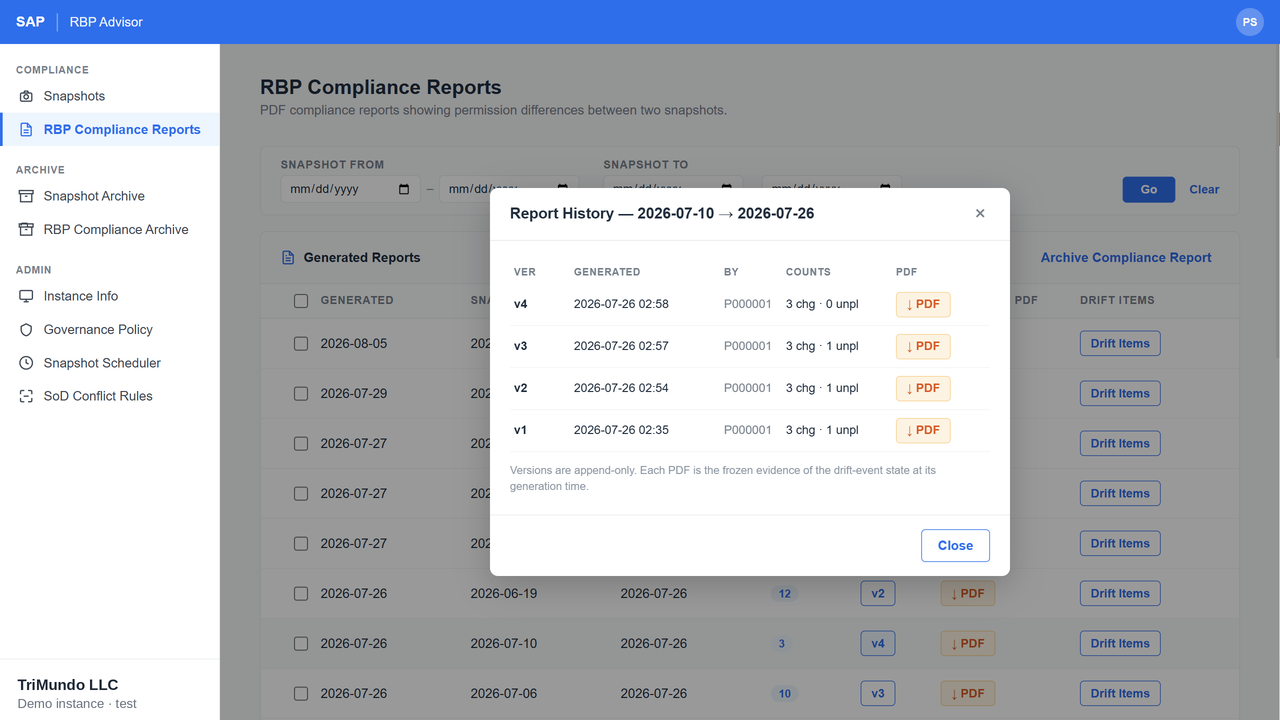
Report versions are append-only. Each PDF is the frozen state of the drift events at the moment it was generated — a later correction adds v5, it does not rewrite v4.

Append-only report version history showing each version's counts, author and frozen PDF

That constraint is the whole point. Evidence a reviewer can see you were able to alter is not evidence — it is an assertion. An append-only record is the difference between a control your auditor tests and one your auditor takes your word for.

Segregation of duties, tracked over time

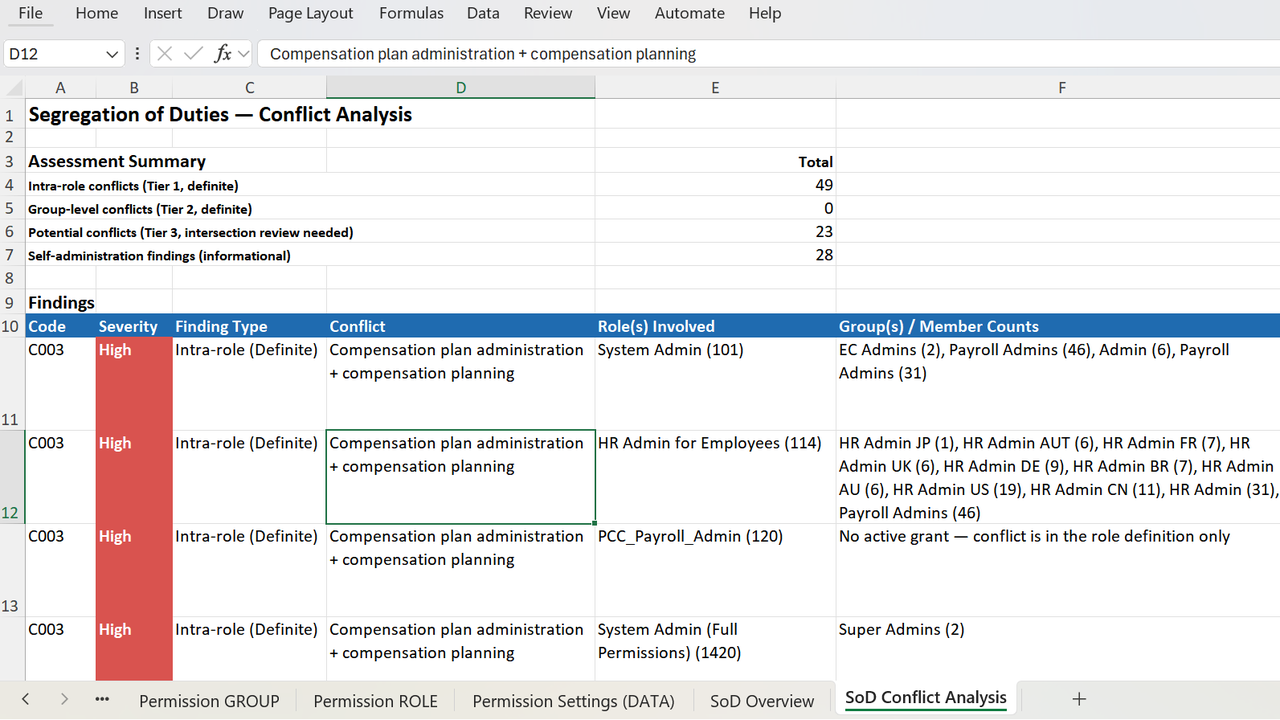
Define the permission pairs that must never sit together, with a severity for each. RBP Advisor counts the conflicts on every snapshot, so the number appears beside each capture and the trend is visible across the year.

Conflicts are reported by severity, by role and by affected group — the form an auditor asks for, not a raw list you still have to interpret.

A conflict count that climbs quarter on quarter is a finding waiting to happen. Seeing it on the snapshot list is how you catch it while it is still cheap to fix.

Exported workbook showing segregation of duties findings by severity, role and affected groups
Segregation of duties findings in the exported workbook.
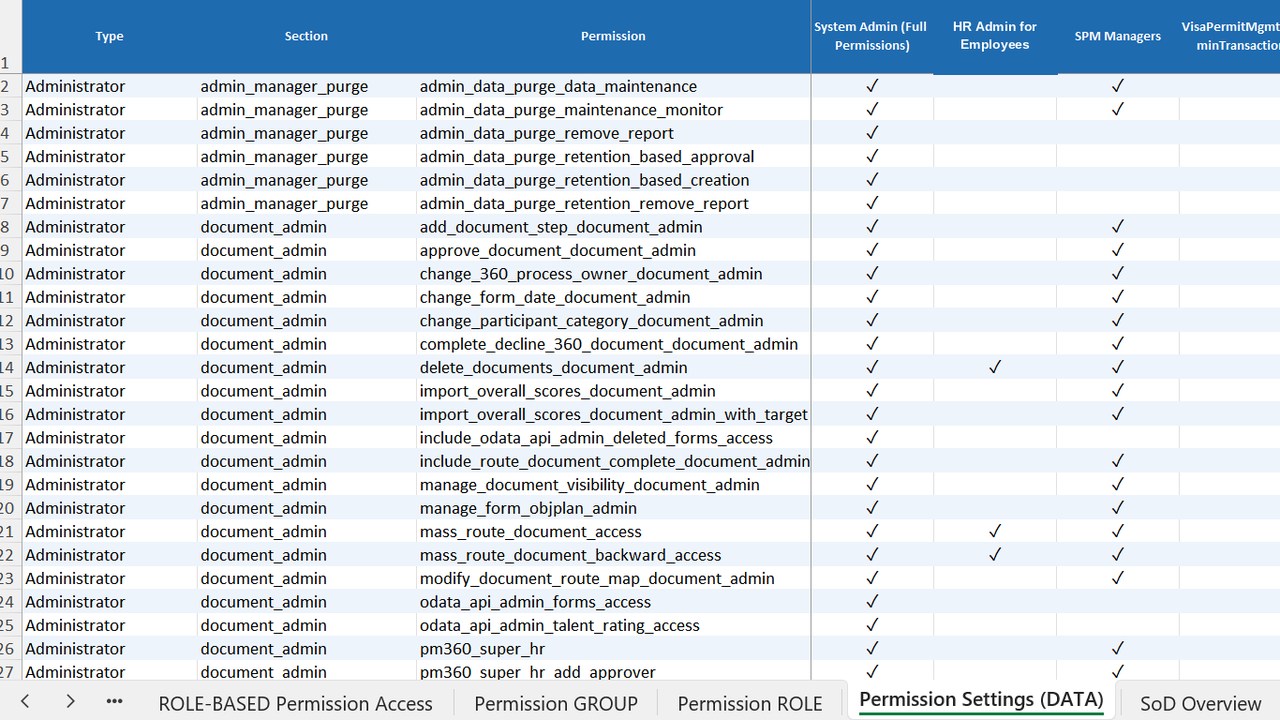
Exported RBP workbook showing the full permission matrix by role in Microsoft Excel
The full permission matrix by role, exported to Excel.

Workbooks your auditor can actually work in

The PDF is the attestation. The Excel workbook is the fieldwork — the complete permission matrix by role, the segregation of duties findings, and the detail behind every figure in the report.

Report figures always reconcile to the underlying record. When a reviewer samples a row and traces it back, it matches.

No more exporting six screens and stitching them together the week before fieldwork starts.

Your control, enforced by the server

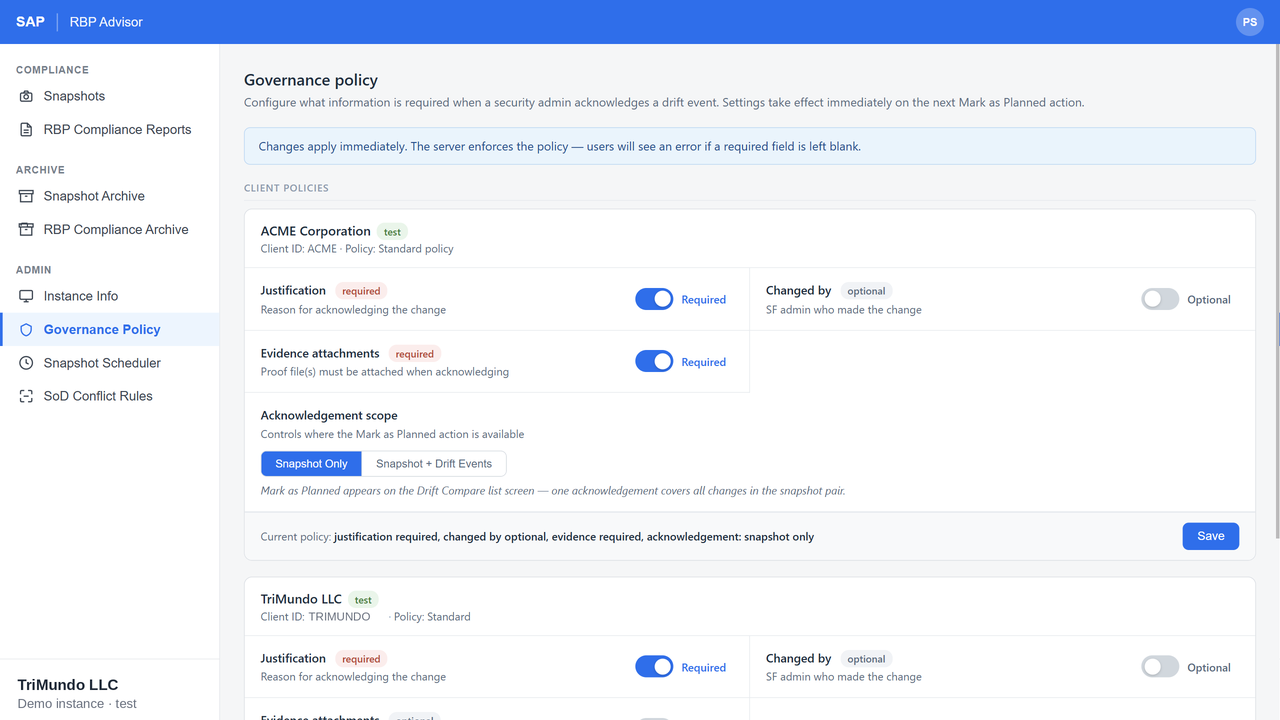
Decide what an administrator must supply before a change can be acknowledged — a justification, the admin who made it, an evidence attachment. The policy is enforced server-side, not suggested in the interface, and it can differ per client.

Governance policy settings defining required justification and evidence per client
Per-client governance policy. Changes take effect on the next acknowledgement.

Fits where your team already works

No new login

Opens from a custom navigation entry in the SuccessFactors Admin Center. Sign-in is automatic through SAP Identity Authentication — administrators keep the identity they already have, and your identity team provisions nothing new.

Your session policy

Signs out after 30 minutes of inactivity, matching SuccessFactors. The tool does not become the weakest link in a policy you have already set.

Multiple clients

Separate instances, snapshots and governance policies per client — built for implementation partners who need to evidence what changed between two phases of a rollout, across several customers.

Who It's For

HRIS and SuccessFactors teams

Who own the permission model and get asked to explain it, usually at short notice.

Internal audit and compliance

Who need evidence that a control operated across a period, not a screenshot of today.

Implementation partners

Who need to show a client exactly what changed between two phases of a rollout.

TriMundo LLC is an SAP PartnerEdge partner. RBP Advisor is built on SAP Business Technology Platform.

Try it on your own permissions

A trial on a non-production instance, with your real permission structure. Sample data tells you very little about a governance tool — the value only shows when you compare two captures of your own configuration.

45 days

To evaluate

The trial runs for 45 days on a non-production instance, so there is room to get it connected, take captures and still have time to make a decision.

30 days

Guaranteed from first capture

However long the connection takes at your end, you get at least 30 days from your first snapshot. Provisioning delays do not eat your evaluation.

Non-prod

Nothing touches production

Point it at a test or preview instance. Your security team gets to watch it work before it goes anywhere near live data.

Start Your Free Trial

Trial terms are set out in full in our Terms & Conditions.

Or let us show you first

The fastest way to understand RBP Advisor is to watch it compare two snapshots and produce the attestation.

We will walk you through a live comparison, show you the drift log, the segregation of duties findings and the workbook, and answer the questions your audit team will ask before they ask them.

Questions first? Email sales@trimundo.net